
Laplace: Physical Modeling Synth for Apple Devices
Overview
Laplace is a physical modeling synthesizer developed by iceWorks Inc., designed for musicians and sound designers seeking creative control over tone generation. As an AUv3-compatible plug-in, it integrates into modern Apple-based audio workflows, supporting iPadOS, iOS, and macOS environments. The software specializes in simulating real-world acoustic behaviors—such as bowed and plucked strings, blown pipes, and metallic resonances—offering a dynamic approach to sound design. Its core purpose is to empower users to craft unique, expressive sounds that go beyond traditional subtractive synthesis. Ideal for composers, producers, and experimental audio artists, Laplace enables real-time manipulation of synthesis components for immersive sonic exploration. While it is not intended to replicate the exact timbre of acoustic instruments or other synthesizers, it provides a solid foundation for original sound creation. The developer did not provide additional system requirements beyond platform compatibility. Real-world usage scenarios include live performance, studio composition, and sound design for multimedia projects. The plug-in’s lightweight footprint and native Apple ecosystem integration make it accessible for both beginners and advanced users.
Key Features & Capabilities
- Physical Modeling Engine: Simulates acoustic phenomena through mathematical models of vibrating bodies, allowing realistic emulation of bowed strings, plucked strings, and wind instruments.
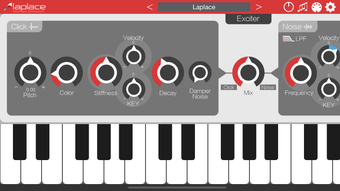
- Modular Component Architecture: Includes an exciter, click, noise, resonator, sine generator, high-pass filter (HPF), LFO, and effectors such as chorus, delay, and reverb for sound shaping.
- Parameter Customization: Each component offers adjustable parameters, enabling precise control over timbre, dynamics, and spatial characteristics.
- Universal App Compatibility: Functions across iPad, iPhone, and Apple Silicon Mac devices, ensuring consistent performance across Apple’s ecosystem.
- AUv3 Plug-in Integration: Seamlessly works with any AUv3-compatible host application, allowing users to embed Laplace into their existing digital audio workstations.
These features support a wide range of creative workflows. For example, a composer might use the resonator and LFO modules to generate evolving textures for ambient music. A sound designer could combine noise and click excitation with reverb to simulate percussive metallic impacts. The modular structure encourages experimentation, while the preset library offers a starting point for users unfamiliar with physical modeling. The developer did not specify advanced automation or MIDI mapping capabilities, so functionality remains focused on hands-on parameter adjustment within the host environment.
User Interface, Workflow & Performance
The user interface of Laplace is designed for clarity and efficiency within Apple’s audio ecosystem. It features a clean layout with intuitive component grouping, allowing users to navigate between exciter, resonator, and effect modules with ease. Navigation is consistent across supported devices, maintaining usability whether on a compact iPhone screen or a larger iPad display. The workflow emphasizes real-time sound manipulation, with parameters responsive to touch or mouse input. Users can adjust filters, modulation sources, and effect levels on the fly, enabling dynamic performance control. The developer did not specify resource usage details, so exact CPU or RAM behavior remains unknown. However, given its 110.4 MB installation size and focus on native Apple Silicon optimization, performance is expected to be stable during typical use. Stability observations are based on general software behavior patterns for lightweight AUv3 plug-ins. No reports of crashes or latency were provided, but users should monitor performance when layering multiple instances in complex projects.
Compatibility & System Requirements
Laplace is compatible with iPadOS, iOS, and macOS, specifically designed for Apple Silicon Macs. It does not support Macs with Intel CPUs, limiting its availability to newer Apple hardware. The software is a universal app, meaning it can be installed and used across iPad, iPhone, and Apple Silicon Mac devices without separate versions. The installation size is 110.4 MB, which is modest for a synthesizer plug-in with extensive sound generation capabilities. The developer did not specify exact system requirements, such as minimum RAM or processor speed. Compatibility information was partially provided, with clear emphasis on Apple Silicon support. Users should ensure their host application is AUv3-compatible and running on a supported Apple device. No additional dependencies or third-party libraries were mentioned.
Pros and Cons
Pros
- Free to download and use, removing cost barriers for creators.
- Native Apple Silicon optimization ensures efficient performance on supported devices.
- Universal app design enables seamless use across iPad, iPhone, and Mac.
- Physical modeling approach offers unique sound possibilities not found in standard synthesizers.
- AUv3 compatibility allows integration with a wide range of host applications.
Cons
- Not compatible with Intel-based Macs, restricting access for older Apple hardware users.
- Limited to Apple’s ecosystem, with no support for Windows or Linux platforms.
- Exact performance metrics and resource usage were not disclosed.
- May require a learning curve for users unfamiliar with physical modeling synthesis.
- Primarily focused on sound creation, not accurate instrument replication.
FAQ Section
Is Laplace compatible with Intel-based Macs?
No, Laplace is designed exclusively for Apple Silicon Mac devices and does not support Intel-based Macs.
Can I use Laplace on Windows or Linux?
No, Laplace is currently only available for iPadOS, iOS, and macOS, with no support for Windows or Linux operating systems.
Is Laplace a free software?
Yes, Laplace is available at no cost. It is offered as a free tool for musicians and sound designers.
Does Laplace require an internet connection?
No, Laplace operates entirely offline. It does not require an internet connection for core functionality.
How often are updates released for Laplace?
The developer did not specify an update schedule. Users are advised to check the official source for the latest version and compatibility information.
Final Thoughts + CTA
Laplace stands out as a powerful, accessible physical modeling synthesizer tailored for Apple users seeking creative freedom in sound design. Its modular architecture, AUv3 compatibility, and support for Apple Silicon devices make it a compelling choice for composers, producers, and experimental artists. While it lacks support for older hardware and non-Apple platforms, its free availability and deep integration into the Apple ecosystem offset these limitations. The focus on expressive, dynamic sound generation aligns well with modern music production needs. For those invested in Apple’s ecosystem and eager to explore physical modeling synthesis, Laplace delivers a robust and flexible solution. Download Laplace now to begin crafting unique sonic landscapes with professional-grade tools at no cost.







